Forms
Fast-gov-uk have some handy features to build GDS forms.
An Example
Let’s start with a familiar example. User feedback is an important part of every GDS service -
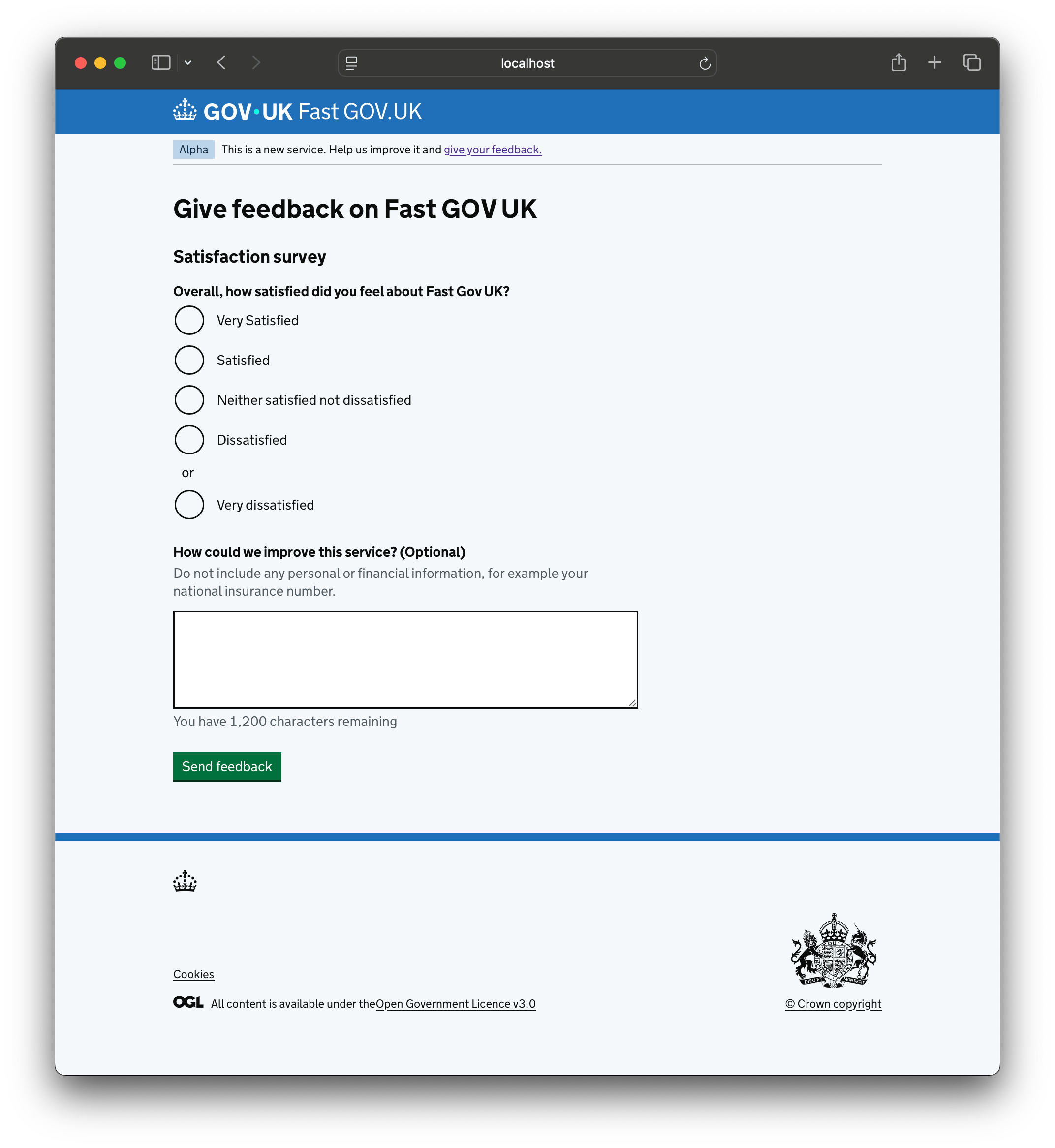
The following is how you would build this feedback form in fast-gov-uk -
 1@fast.form
 2def feedback(data=None):
 3    return forms.Form(
 4        "feedback",
 5        ds.H1("Give feedback on Fast GOV UK"),
 6        ds.H2("Satisfaction survey"),
 7        ds.Radios(
 8            name="satisfaction",
 9            label="Overall, how satisfied did you feel about Fast Gov UK?",
10            choices={
11                "very-satisfied": "Very Satisfied",
12                "satisfied": "Satisfied",
13                "neutral": "Neither satisfied not dissatisfied",
14                "dissatisfied": "Dissatisfied",
15                "very-dissatisfied": "Very dissatisfied",
16            },
17            heading="s",
18        ),
19        ds.CharacterCount(
20            name="comments",
21            label="How could we improve this service?",
22            maxchars=1200,
23            required=False,
24            hint=(
25                "Do not include any personal or financial information, "
26                "for example your national insurance number."
27            ),
28            heading="s",
29        ),
30        backends=[forms.LogBackend()],
31        success_url="/",
32        data=data,
33        cta="Send feedback",
34    )
1. The form decorator “registers” feedback function as a form rendered at
/forms/feeback. You can easily render this form at a different url -
@fast.form("/not-feedback") will render the form at /forms/not-feedback.
2. The feedback function must return a Form object (see below) and it must accept
a data argument because forms can be empty or filled and when they are filled, the
data argument would contain the values to populate the fields in our form.
3. The Form class is used to define a form. A Form can have any number of fast-gov-uk
components but it is expected that at least some of these would be Field components
as defined in fast_gov_uk.design_system.inputs.py module. Here we have a Radios
field and a CharacterCount field.
30. The Backend class defines what happens when a form is processed upon submission.
Here we are using the LogBackend which - as the name suggests - logs the values that
were submitted in our form.
31. The success_url parameter defines the URL that we redirect to after a form is
processed.
Form Backends
Fast-gov-uk comes out-of-the-box with the following form backends -
- class fast_gov_uk.forms.LogBackend
Backend that logs form data. This is mainly useful for debugging.
Example
@fast.form
def email(data=None):
    forms.Form(
        "email",
        ds.EmailInput("email"),
        backends=[forms.LogBackend()],
        data=data,
    )
- class fast_gov_uk.forms.DBBackend(db, *args, **kwargs)
Backend that stores data in the DB. Requires a db instance.
Example
@fast.form
def email(data=None):
    forms.Form(
        "email",
        ds.EmailInput("email"),
        backends=[forms.DBBackend(db=fast.db)],
        data=data,
    )
The data is stored in the “forms” table in the given database. It has the following format -
name (str): name of the form e.g. “email” for our example
created_on (datetime): Timestamp for when the form was processed
data (dict): JSON blob of the form data e.g.
{"email": ".."}for our example
In order to use this backend, you need to pass in
DATABASE_URLin your settings when instantiatingFastobject, like so -fast = Fast({ "DATABASE_URL": "service.db", })
This will create a sqlite database called
service.dbin your root directory and theDBBackendwill store the data submitted in forms to the same database.- Parameters:
db – Database instance.
- class fast_gov_uk.forms.EmailBackend(notify, *args, **kwargs)
Backend that sends submitted forms to the given email address.
Example
@fast.form
def email(data=None):
    forms.Form(
        "email",
        ds.EmailInput("email"),
        backends=[forms.EmailBackend(
            fast.notify("<notify_template_id>", "test@test.com")
        )],
        data=data,
    )
In order to use this backend, you need to -
create an account for your service in GOV.UK Notify
create an API key under “API Integration” and finally
pass-in your API key when instantiating
Fastusing environment variables like so -
from os import environ as env

fast = Fast({
    "NOTIFY_API_KEY": env.get("NOTIFY_API_KEY"),
})
You would also need to create an email template in your GOV.UK Notify service account -
((service_name))
Someone submitted the form: “((form_name))” with the following data -
((form_data))
- Parameters:
notify – Notification function to send emails.
- class fast_gov_uk.forms.APIBackend(url, username, password, *args, **kwargs)
Backend that sends submitted forms to an API.
Example
@fast.form
def email(data=None):
    forms.Form(
        "email",
        ds.EmailInput("email"),
        backends=[forms.APIBackend(
            url="https://test.com",
            username="test_user",
            password="test_password"
        )],
        data=data,
    )
The format of the payload is -
{
    "form_name": "email",
    "submitted_on": <datetime when the form was processed>,
    "email": <email address submitted by the user>,
    ...
}
This implementation is more-or-less a placeholder, an exemplar of how you would implement an API backend for an API with basic HTTP auth. It is likely that your API might use different authentication or indeed a different format for the payload. If this is the case, rip-off this code to write your own API backend.
- Parameters:
url (str) – API endpoint URL.
username (str) – Username for basic auth.
password (str) – Password for basic auth.
- class fast_gov_uk.forms.SessionBackend
Backend that stores form data to the session cookie.
Example
@fast.form
def email(data=None):
    forms.Form(
        "email",
        ds.EmailInput("email"),
        backends=[forms.SessionBackend()],
        data=data,
    )
The format for data persisted in the session cookie for our example would be -
{"email": {"email": "test@test.com"}}